다양하고 유용한 맥스 스크립트들... - ◀ 원문보기 클릭


한명이 만든 스크립트 같은데, 대부분 꽤 유용해 보이는기능들이 많네요.
Radius Influence
A new maxscript tool inspired by C4D tools :
http://vimeo.com/35145361
http://vimeo.com/33174546
A Sphere Gizmo control position, rotation, scale and visibility of selected objects, you only have to choose the axis you want to animate.
Update :
I find the way to enhance this script by key baking the objects, so now, no limitations in the number of objects.
You have to select the objects you want to bake and run another script.
It will place old objects in a layer named "OLD" and copy them with their animation but in keyframe.
A Comparison between my 3 new tools :
Tentacle creator, Rotation Spring and Rotation-Tentacle-Spring.
The first is a procedural animation tool for tentacle motion.
The second is like a spring, but on rotations. You can apply it on a bone Chain.
It creates delay rotations following translations and rotations of the master or its parent.
the third is a combination of these two tools : A spring delay rotation added to a Tentacle motion.
A Maxscript to create procedural tentacle animations on a bone chain.
You can control speed, amplitude, offset... on X, Y and Z axis.
You can Also apply random values, and animate the properties.
DOWNLOAD
This tool add a Float Script on the selected object. It forces the object to always rotate (or lookat), following
the movement of the Master. You don't have to rotate the object by yourself, only to translate the Master in autokey.
DOWNLOAD
This tool allows you to assign the most common position and rotation constraints on a selection of objects, and
edit the parameters constraints on the objects in selection in one time.
Download
Render Farm Manager
A new maxscript tool developed at Big Company with the Help of my friend an colleague Jeremy Angonin to manage our render farm.
With this scrip you can kill, start or reboot the backburner Manager, the backburner servers, the Vray Spawners, and the Render Farm Computers.
It works on selected servers or on all the servers.

Sticky Cluster
A new maxscript tool to add controllers to a mesh animated by morphers.
These controllers follow the mesh deformations, and you can skin your mesh with them.
You can add morphers after the creation of clusters, or at any time.
You can move, scale, rotate, these clusters to refine your deformations.
(Sorry the script is applied to an old model).
It creates grass using existing grass model and ground geometry.
You can use map to distribute grass on the ground.
Many controls on the Master for animation, placement, rotation...
It use a classic 3ds Wind Force, that you can modify (force, turbulence...)
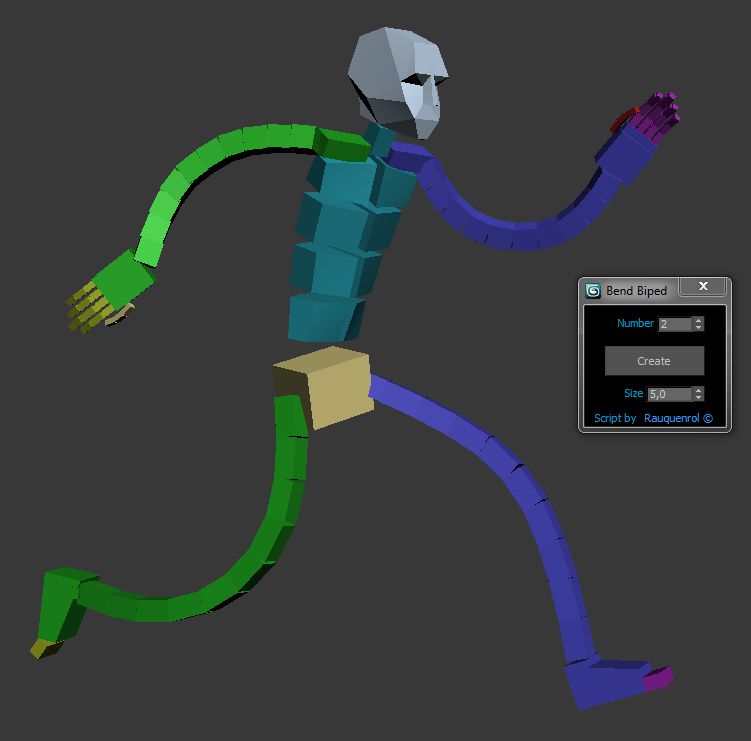
It adds to the biped bend joints on Arms and Legs.
A slider on Hands and Feets control the bend value.
It also can be use to create good twist bones.
It adds the ability to stretch the Arms and legs.
You just have to skin using these new bones and not the biped ones.
But you animate using the original biped bone
DOWNLOAD
RIG HUNTER : Biped WIP
This is a demo of my tool in progress :
Rig Hunter Biped
A realistic Autorig for Arm and Hand.
No Muscles, only Bones, Scripted controllers and classic skinning.
Column and Head are ready too, I have to finish the Legs.
The aim is to obtain a fully customizable, realistic and user friendly autorig.
Created in 3dsmax, in July 2011
You can see an animation created using this tool Here
Create a Rigged camera
All the parameters are on the Point Master.
You just have to animate the Point master and its parameters (Zoom, FOV...)
You can add noise motion on your camera animation using the spinners on the Point Master.
DOWNLOAD

Multi Boolean
A new tool to perform multiple boolean operations (additions and substrations), in one time.
1. Pick the object wich receive the boolean operations using the first button
2. Use the buttons Addition and Substraction to add objects in the lists.
3. If you want to delete objects in the list you have to double click on it.
4.Click on BOOOOOOOOOOL !!! button and additions and substractions are done.
5. When it's done you can delete or hide operands.
DOWNLOAD

Dummy Resizer
A little Tool to create a Dummy and resize it, using hided Dummy properties.
Do not affect the scale values.
DOWNLOAD

One of my last tool.
No Spring, no key backing, just script controller.
Auto-create a scripted bone chain using a point selection.
Automatic wheel rigging Tool.
Realtime rotations based on Controler movements
Before using my script check that your wheel is oriented in front view
Thanks to lutteral for his base of rotation script.
Wire Colorizer

This tool will allow you to assign a wirecolor to a selection through a customizable palette.
You can save and reload.
1 : Le premier colorpicker permet de décliner la couleur choisie sur les 9 autres.
2 : Les boutons "Set" sous chaque colorpicker assignent la couleur correspondante aux
objects sélectionnés.
3 : le bouton ID place dans chaque colorpicker des couleurs bien distinctes, pour
aider à préparer une passe d'ID.
4 : le bouton Rnd place dans chaque colorpicker une couleur aléatoire.
UPDATE 1.1
- Vous pouvez maintenant sauvegarder et recharger, à tout moment et d'une scène à une
autre, vos propres palettes de couleur personnalisées.
Face AutoRig
Voici un outil terminé récemment qui permet de réaliser sur n'importe quel visage un Rig Facial Automatique.Il comporte aussi plusieurs outils très pratiques comme des fonction de Mirror de pose,
un manager de poses qui permet de sauvegarder et reloader des expressions faciales.
Bientôt une fonction de sauvegarde d'animation.
J'ai aussi mis en place une méthode de motion capture faciale, à base de tracking 2D,
et un nouveau script qui permet de transférer les clefs des points trackés sur mes controllers.
Scene Optimizer
Ce maxscript, très utile en production,permet de cacher dans un nouveau calque
tous les objets en dehors du champ de la camera.
Sur une seule frame ou une animation complète.
Il s'exécute sur une sélection d'objets.
Noise Animator

Sur une seule frame ou une animation.
Il pose une clef toutes les frames ou toutes les n' frame.
Les axes peuvent être paramétrés séparément et être limités à certaines valeurs.
Outil pratique sur des positions fixes pour ajouter un côté aléatoire, ou pour animer un grand nombre d'objets.
Smooth Distance
Ce maxscript permet d'optimiser les objects qui ont un modifier TurboSmooth.
Il détecte les objets qui ont un turbosmooth et lie le nombre d'itérations à la
distance par rapport à la caméra ou tout autre objet.
Visible dans le viewport pour vérification ou seulement au rendu pour une meilleure optimisation.
Possibilité d'exclure certains objets.
Les fonctions de reset permettent de remettre les itérations à 0 ou à une autre valeur fixe.
MULTI PhysX
Ce Maxscript permet de régler les paramètres de base du PhysXsur les objects sélectionnés. Il évite d'avoir à régler le PhysX des objects un par un.
N'hésitez pas à me faire savoir si vous souhaitez que j'ajoute d'autres fonctions.
Je vais très certainement finir par reproduire entièrement tous les réglages du plugin, pour qu'ils puissent s'appliquer à une selection d'objects.
Download Max 2010 version
Download Max 2011 version
Alioscopy Previewer
Ceci est un Maxscript que j'ai développé pour le Studio Big Company à Lyon.Il fonctionne en accord avec la technologie d'écrans refief sans lunettes d'Alioscopy
Il permet de créer une prévisualisation des 8 caméras nécessaires à l'Alioscopy.
A la frame courante ou sur la durée choisie.
Il créé les dossiers et sous-dossiers requis par le Player d'Alioscopy et y range les images de prévisualisation.
Il génère les images au format requis par Alioscopy.
Cela évite d'avoir à lancer et paramétrer à la main les previews pour les 8 caméras et leurs
dossiers de destination.

| 1070명이 보셨네요 |
| Evernote에서 전송 |

댓글 없음:
댓글 쓰기